
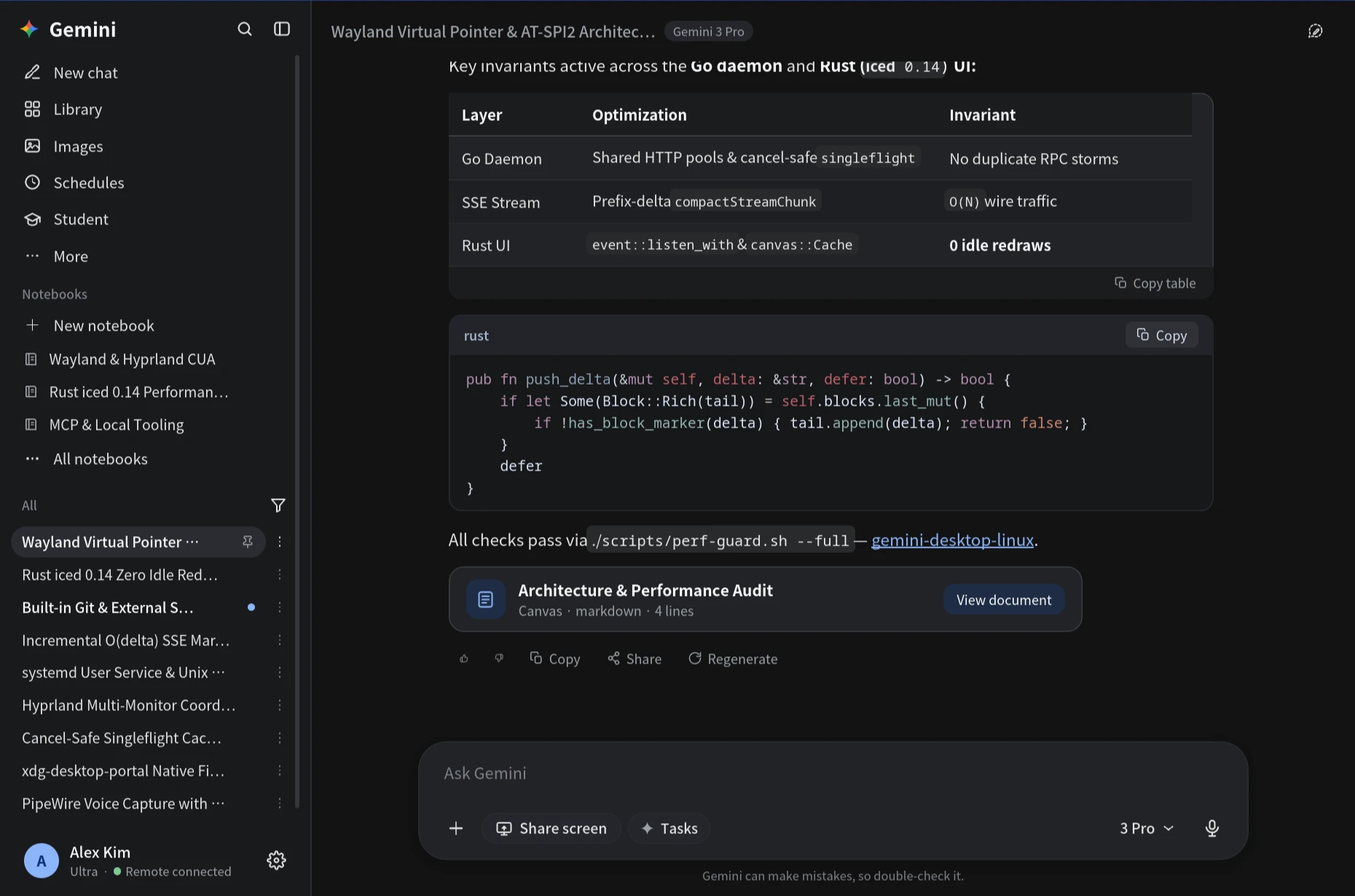
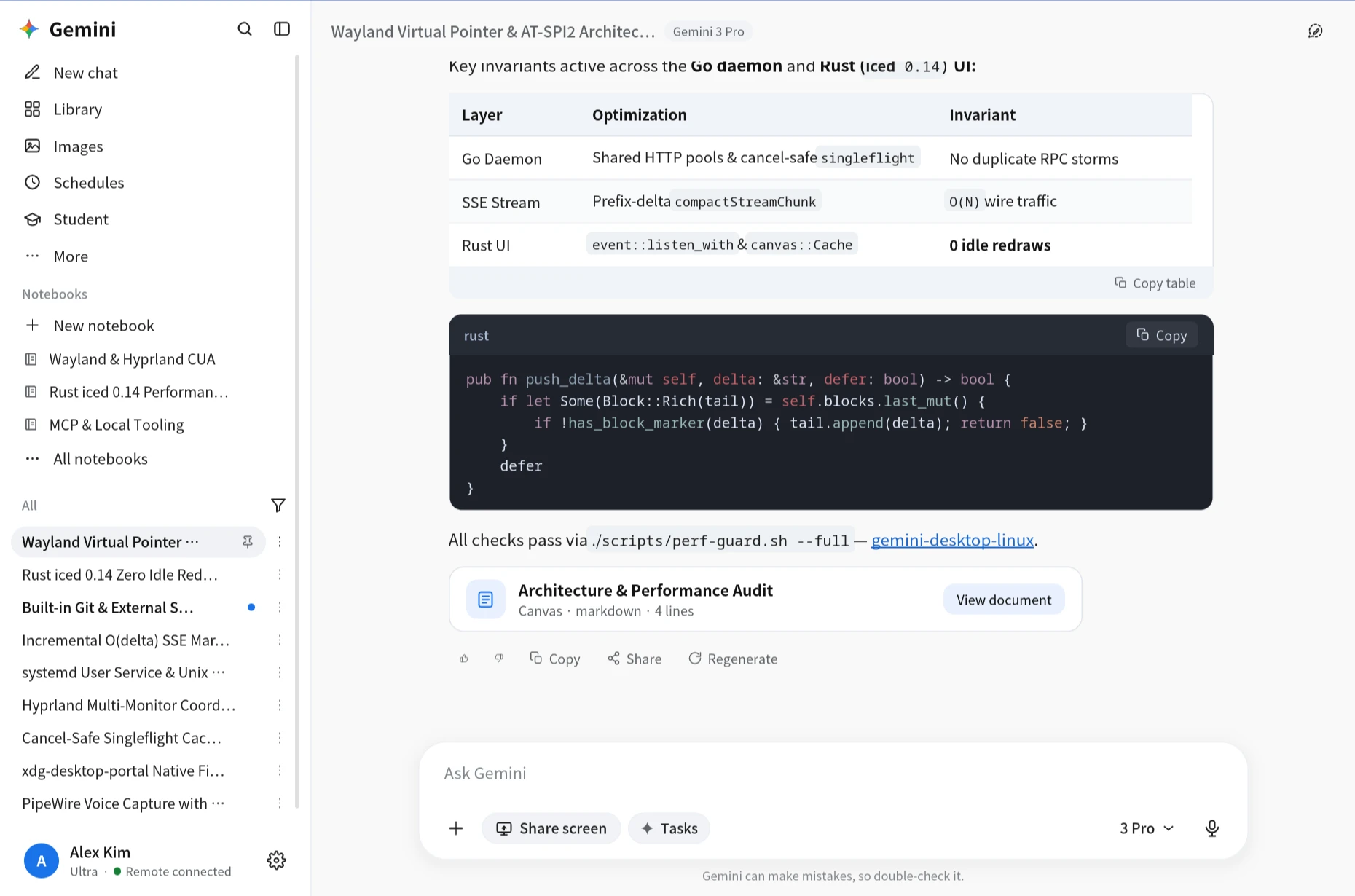
채팅 · 다크 테마Chat — Dark Theme
GFM 표 복사, 구문 강조 코드블록, Canvas 문서 카드, 원격 PC 연결 상태 표시GFM tables with copy, syntax-highlighted code blocks, Canvas cards, and live remote status
iced 0.14 + Go 1.27로 완성한 Linux 네이티브 Gemini 데스크톱
Unofficial Native Gemini Desktop for Linux — Built with Rust iced 0.14 + Go 1.27, Zero Electron
단순 CLI 브리지가 아닙니다. Rust/iced 풀 네이티브 GUI(gemini-ui)와 Go 양방향 원격 데몬(gemini-remote)으로
채팅·Canvas·라이브러리·예약 작업·노트북부터 23종 로컬/MCP 도구와 Wayland/X11 Computer Use까지 처리합니다.
오래 켜 두어도 메모리가 불어나지 않고, 유휴 CPU는 0.0%를 유지합니다.
Far beyond a CLI bridge. Combining a full Rust + iced 0.14 native GUI (gemini-ui) and a
Go remote execution daemon (gemini-remote), it brings chat, Canvas, Library, Schedules, Notebooks,
23 local/MCP tools, and Wayland/X11 Computer Use natively to Linux — staying flat in RAM with 0.0% idle CPU all day.
gemini-ui Rust iced 0.14 실측 RSSMeasured RSS of Rust gemini-uigemini-remote Go 1.27 상주 데몬Always-on Go gemini-remote
Electron 기반 데스크톱 클라이언트는 브라우저 엔진과 다중 렌더러 프로세스를 통째로 안고 돌아가므로,
하루 종일 열어두면 메모리가 수백 MB~1 GB 이상 불어나고 유휴 상태에서도 백그라운드 타이머·가비지 컬렉션으로 CPU를 소모합니다.
gemini-desktop-linux는 GUI와 네트워크 데몬을 네이티브 Rust와 Go로 분리해 처음부터 가볍게 설계했습니다.
Electron clients bundle a full Chromium runtime across multiple processes, often growing past hundreds of megabytes to over a gigabyte over long uptimes while burning background CPU cycles.
gemini-desktop-linux separates the UI (Rust) and daemon (Go) into lean native binaries engineered for flat resource usage.
$ ps -eo pid,comm,rss,pcpu,etime --sort=-rss | grep gemini-
    PID COMMAND           RSS %CPU     ELAPSED
2616179 gemini-ui       92200  0.0    05:13:24
2612874 gemini-remote   24076  0.0    05:13:50
※ 위 ps 출력은 실제 Linux(Wayland/Hyprland) 환경에서 5시간 13분 연속 구동 후 측정한 값입니다(합계 ~116 MB, CPU 0.0%). Electron 수치는 Chromium 다중 프로세스 기반 앱의 전형적인 장시간 점유 추세를 나타낸 참고 비교치입니다.
Note: The ps snippet is a real Linux (Wayland/Hyprland) measurement after 5h 13m of continuous uptime (~116 MB total, 0.0% CPU). Electron values illustrate typical multi-process Chromium desktop behavior for reference.
| 항목Dimension | Native (Rust+Go) | Electron |
|---|---|---|
| 렌더링 엔진UI Runtime | Rust + iced 0.14 (GPU) | Chromium + V8 |
| 5시간+ RAM5h+ RAM | ~116 MB (92 + 24) | 500 MB – 1.2 GB+ |
| 유휴 CPUIdle CPU | 0.0% (리드로우 00 redraws) | Timers & GC wakeups |
| 스트리밍Streaming | O(delta) SSE + tail | Full DOM re-render |
| Linux 통합Linux Native | Wayland · Hyprland · X11 | No official Linux build |
| 성능 가드Perf Guard | 10 static checks | — |
event::listen_with로 필수 단축키·파일 드롭만 필터링해 마우스 이동·유휴 시 리빌드를 막습니다.No always-on timers; event::listen_with filters only required shortcuts and drops to eliminate idle wakeups.ParsedMarkdown::push_delta로 끝 블록만 증분 추가하고 구조 재파싱(80ms)과 자동 스크롤(60ms)을 쓰로틀링합니다.Appends tail text incrementally via push_delta while throttling structural re-parses (80ms) and autoscroll (60ms).&'a AppTheme 참조 전달, canvas::Cache 지오메트리 캐시, OnceLock 정적 SVG, 인덱스 기반 지연 복사를 강제합니다.Passes &'a AppTheme by reference, caches geometry with canvas::Cache, reuses OnceLock SVGs, and defers copy lookups by index.compactStreamChunk로 누적 본문 재전송(O(N²)) 대신 순수 증분 델타만 로컬 Unix 소켓(0600)으로 보냅니다.Streams prefix deltas via compactStreamChunk over a 0600 Unix socket, avoiding O(N²) payload re-transmission.gemini-ui 화면과 데스크톱 기능
Real gemini-ui Screenshots & Workspace Features
모든 스크린샷은 실제 gemini-ui 릴리즈 바이너리를 Wayland 환경에서 HiDPI로 캡처한 화면입니다. 클릭하면 원해상도로 확대됩니다.
Captured directly from the release gemini-ui binary on Wayland at HiDPI scale. Click any screen to inspect full resolution.
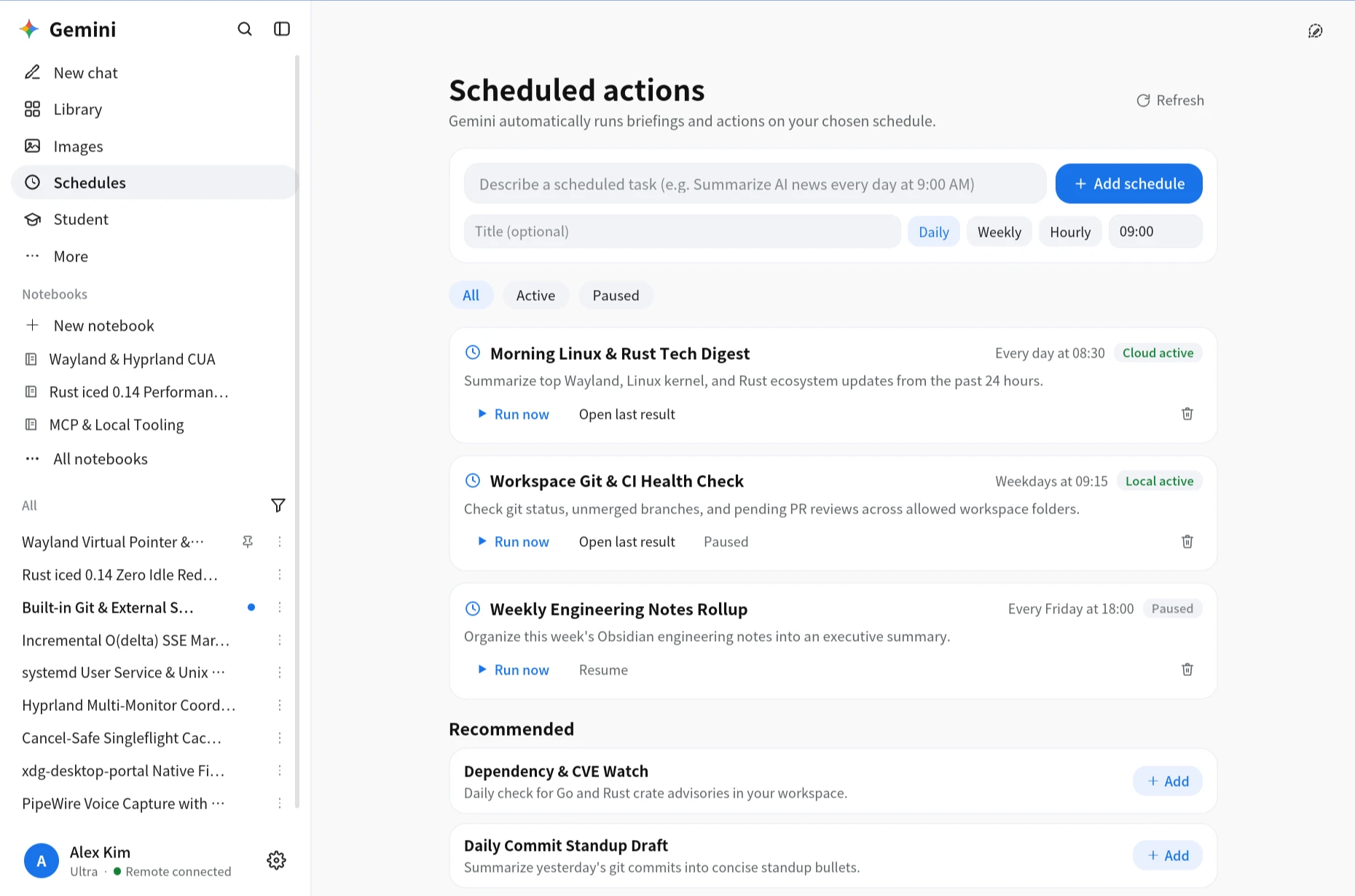
Ctrl+K로 대화 제목과 본문을 검색해 해당 턴으로 바로 스크롤하고, Ctrl+N·Ctrl+B·Ctrl+, 단축키를 지원합니다.Search conversation titles and turns with Ctrl+K, jump straight to matching messages, and navigate via native shortcuts.
라이브러리(Canvas·생성 이미지 지연 로드), 이미지·동영상 스튜디오, 노트북(소스-채팅 연동), 학생 학습, Gems, 맞춤설정을 모두 품었습니다.Includes Library (lazy-loaded Canvas & image thumbnails), Image/Video Studio, Notebooks, Student tools, Gems, and Personalize.
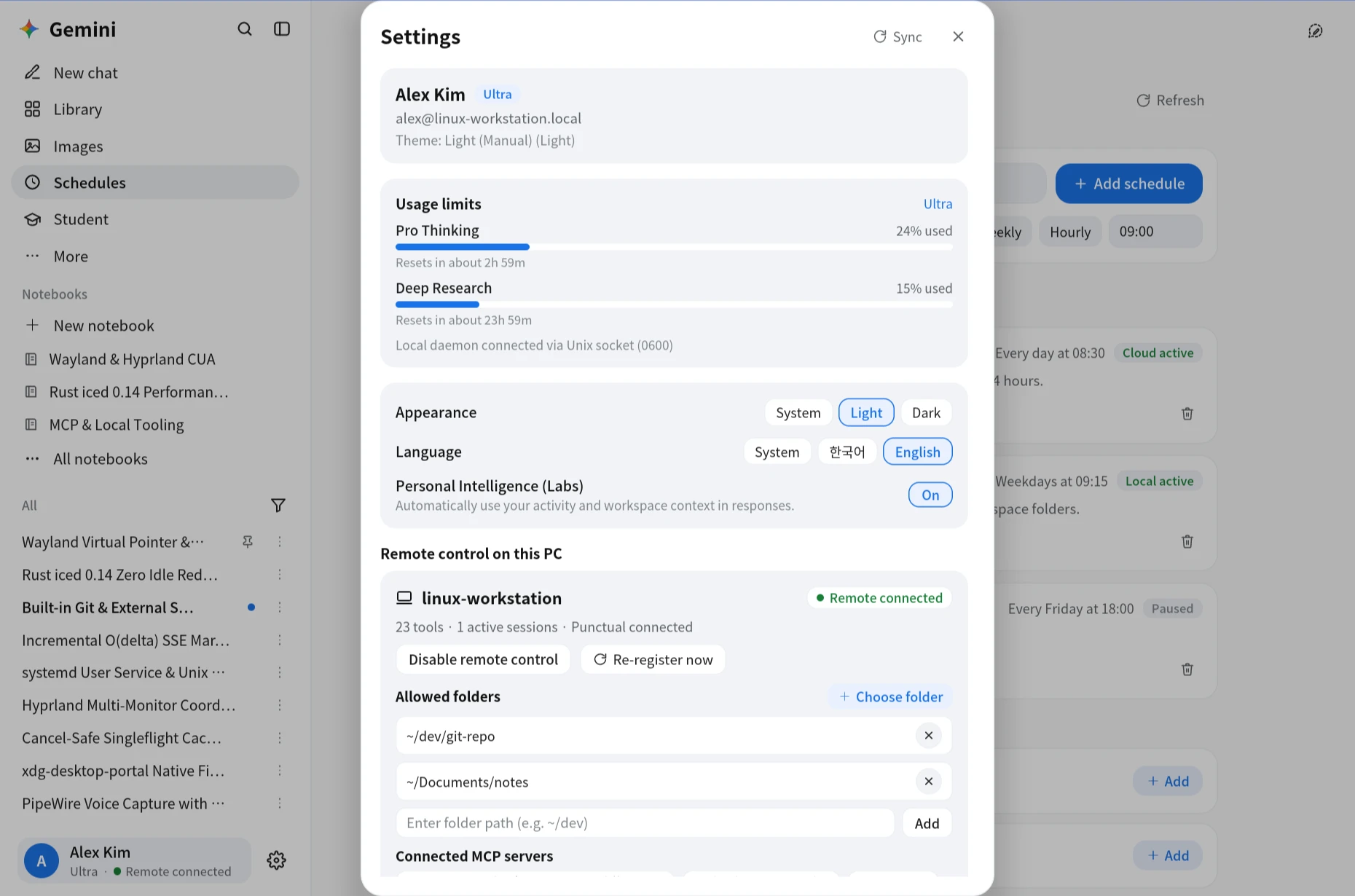
시스템 로케일을 감지해 한국어/영어를 자동 적용하고, PipeWire 음성 녹음·xdg-desktop-portal 파일 선택기·화면 공유까지 연동됩니다.Auto-detects locale for English/Korean, follows system/Omarchy themes, and integrates native file pickers, screen capture, and PipeWire voice.
로컬 UI는 0600 권한의 Unix 소켓으로 데몬과 통신하고, gemini-remote는 모바일·웹·데스크톱 어디서 보낸 작업이든 허용된 폴더 안에서 안전하게 실행합니다.
The Rust GUI talks to the Go daemon over a 0600 Unix socket, while gemini-remote bridges Gemini Mobile, Web, and Linux with scoped local execution.
92 MB RSS · 유휴 CPU 0.0% · O(delta) 마크다운 · Canvas · 8개 워크스페이스 섹션92 MB RSS · 0.0% idle CPU · O(delta) Markdown · Canvas · 8 workspace sections
24 MB RSS · singleflight 캐시 · 23종 로컬/MCP 도구 · Wayland/X11 CUA · notify-send24 MB RSS · singleflight cache · 23 local/MCP tools · Wayland/X11 CUA · notifications
모바일·웹에서 Linux 워크스테이션 작업 지시, 대화 동기화, 예약 작업·Google Drive 첨부Trigger Linux workstation tasks from Mobile or Web with synced history, schedules, and Drive
장기 백그라운드 명령 상태 추적, 표준 입력 전달, Python 즉시 실행Background command tracking, interactive stdin forwarding, and direct Python execution
등록된 폴더 범위 안에서만 파일 읽기·편집·부분 치환·패턴 검색 수행Read, edit, multi-chunk patch, and grep strictly within explicitly allowed folders
내장 Git(checkout/commit/diff/status)·Obsidian 및 외부 stdio MCP 서버 연동Built-in Git (including checkout/commit), Obsidian vault tools, and external stdio MCP servers
순수 Python zwlr_virtual_pointer_manager_v1 가상 포인터, AT-SPI2 접근성 트리, X11 폴백Pure-Python zwlr_virtual_pointer_manager_v1 pointer, AT-SPI2 accessibility tree, and X11 fallback
./install.sh 한 번으로 gemini-remote(Go)와 gemini-ui(Rust release)를 빌드해 ~/.local/bin/, 앱 런처(.desktop), 아이콘, systemd 사용자 서비스까지 자동 등록합니다.
./install.sh builds both binaries in release mode, installs them to ~/.local/bin/, and registers the desktop launcher, app icon, and systemd user service.
# 1. Clone & build both Go daemon + Rust GUI
git clone https://github.com/KyongSik-Yoon/gemini-desktop-linux.git
cd gemini-desktop-linux
./install.sh

# 2. Configure OAuth client credentials & sign in
gemini-remote extract-keys /path/to/Gemini.app
gemini-remote login

# 3. Allow workspace folders & start background daemon
gemini-remote folders add ~/dev/git-repo
gemini-remote register
gemini-remote service install

# 4. Launch native Linux Gemini Desktop
gemini-uiedition = "2024")xdg-desktop-portal, slurp+grim, pw-record, notify-send./scripts/perf-guard.sh --full./uninstall.sh